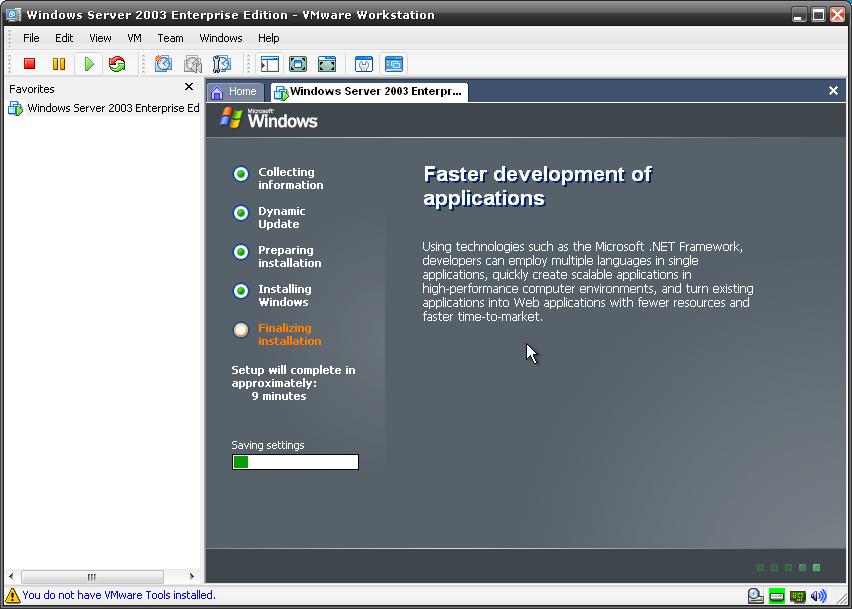
Today i had to install Windows 2003 R2 + SP2 (downloaded from MSDN) within a virtual machine because i needed a DC for a physical testcluster (if your not into IT, this sentence must be a pain in the ass).
I noticed that the installer just kept on going forever at the “installing devices” part.
Did you know that you can press SHIFT-F11 during setup to see that windows is doing? In this case the ‘add new hardware’ wizard was running.
You can also use SHIFT-F10 to get a command prompt
After some research i found the solution:
1) Reset the virtual machine (don’t boot from cdrom)
2) Keep the focus within the virtual machine (don’t ctrl-alt)
You’ll see it works this time, probably has something to do with the detection of keyboard and/or mouse.
January 18th, 2008 at 23:37
I had the exact problem on my VMware server, so this was a great help to me! Thanks for posting it – Jeff
January 19th, 2008 at 11:02
Glad to help you out! Thanks for leaving a reply!
January 23rd, 2008 at 0:11
Thanks a lot for this. Couldn’t find the solution anywhere until I stumbled across this site.
February 15th, 2008 at 4:45
Thank god i found this post. 🙂
March 12th, 2008 at 9:22
Thanks a lot,Pieter!
April 30th, 2008 at 3:51
Thanks, I thought something was wrong for sure until I found this site!
May 29th, 2008 at 18:28
You’re the man!
June 7th, 2008 at 15:37
This exact same solution solved the exact same problem for me, except I’m using QEmu for Linux & installing WinXP as a guest.
September 18th, 2008 at 13:15
Thanks for the tip!
October 29th, 2008 at 23:52
I wasted 20 minutes today staring at the VM console. It would have turned into several hours except for this site. Thanks!
January 5th, 2009 at 2:32
Your post really helped me, would have never thought that not being on the program would have caused this. Thank you very much!
January 9th, 2009 at 14:54
thank you also for this tip, I felt into this trap also this morning …
January 18th, 2009 at 21:57
Thanks a lot, if I never read this I would have left it hanging at that stage for hours.
January 29th, 2009 at 0:53
I ran into this same problem.
Stuck at 37 minutes, “Installing Devices”.
I restarted the VM and did not take the mouse/keyboard out of the VM as you suggested. I am now humming right along with the remainder of the install.
I also didn’t know about the Shift F10 and F11 tricks and I have installed and configured a lot of servers. I love to learn great tips like this. Thanks for taking the time to post this.
February 9th, 2009 at 16:54
Really thanx….this is help me too =)
February 19th, 2009 at 12:13
Yeah!
Thanks a lot, man, this solution also helped me.
The same issue exists installing Win Server 2003 under Virtual PC 2007 – so this is not a VMWare glitch, but Windows one.
— Red
February 21st, 2009 at 5:45
Wow… this post saved me a bunch of time…
Thanks!
May 4th, 2009 at 8:59
I had the issue with Virtual PC 2007 on Vista home premium, trying to install XP. Helped for me! Thanks!!
May 5th, 2009 at 14:33
genius
May 21st, 2009 at 21:54
This helped me so much!!!!!!! THanks!
May 26th, 2009 at 8:17
So all I have to do is take out the disk and reset the virtual machine and that’s it?
June 11th, 2009 at 1:33
Thanks very much. Your suggestion worked for me too! 🙂
June 16th, 2009 at 17:07
[…] https://pieter.wigleven.com/it/archives/11 […]
July 6th, 2009 at 17:16
Thanks!!!!
July 10th, 2009 at 2:59
Yes.. excellent work.. worked a treat…. took a few reboots for me.. but got there in the end… This was on ESXi server using a ISO
September 25th, 2009 at 7:44
hi, very much thanks fotr this help yaar..
i am really stuck up with this error now..
i ll reset my machine.. and i ll do the installation again
than u very much yaar……….
September 25th, 2009 at 11:56
ty for this
October 13th, 2009 at 15:44
Thank you!
November 13th, 2009 at 21:22
You are a genius !!!! Thanks !!!!!!!!!!
November 25th, 2009 at 21:58
Thank you, had the very same problem on VMWare ESXi 4.0
This fixes it!
November 30th, 2009 at 2:37
thx. I am installing windows xp on windows xp.. encountering exactly the same problem and being solved by the same method.
December 15th, 2009 at 19:32
Thanks for posting this.
February 5th, 2010 at 15:46
Thank you very much, I spent almost 2 days trying to reinstall a windows 2003 server in ESXi 4. I am going to leave it on focus now. The Shift+ F10 is also nice to know;-)
Thanks once more.
April 30th, 2010 at 15:05
Just wanted to say this was a time saver. I waited way to long for it to get past this screen before I found this post. THANKS!
July 16th, 2010 at 20:14
You, sir, are a genious. Saved me for up to unlimited hours. Thank you!
August 17th, 2010 at 18:56
Good job on this!! Saved me lots of time!
October 4th, 2010 at 13:54
OMG!!! So much time wasted for something so stupid!!! Thanks for your tip, saved me a lot of hair!!! BTW, I wasn’t using VMware, but Hyper-V and had the same issue.
November 12th, 2010 at 14:17
Excellent, thanks very much!
January 4th, 2011 at 15:20
Thank you! Thank you! Thank you! Who knows how long I would have tried to figure this out.
January 11th, 2011 at 8:29
Thanks so much! I’ve lost a lot of hours today waiting for this dumb thing to install. (Or am I the dumb thing? Wait, don’t answer that.) Again, thanks!
January 16th, 2011 at 4:01
Thx.. it’s the simple things that get us sometimes.. 🙂
April 14th, 2011 at 17:24
Thanks a million, this saved lot of my time, otherwise I always let windows sit there for a while when installing an OS, specially when its on VM … lol
Thanks again, great job by posting it on the blog.
May 3rd, 2011 at 14:05
Worked like a charm. Many thanks.
May 12th, 2011 at 22:02
Hi just trying to understand the thing…totally new to Mac but need windows on my G5 PPC so how do you reset VM ???
Thanks a lot,
Alex
June 9th, 2011 at 7:39
Thanks GOD! You rock! You saved my day man.
August 18th, 2011 at 8:58
many thanks !
September 10th, 2011 at 12:27
Oh man! Thanks so much!!! You’re lucky you only wasted the 20 mins waiting- I was running programs in the background and dragged it out for an entire morning!!!
September 14th, 2011 at 14:16
thanks so much for creating this page. you saved me a lot of time. it seems so obvious when you know the solution!
November 6th, 2011 at 0:46
So simple!
Your fix also works when installing SBS2003 on Hyper V. I left the dvd running last night on my Hyper V and came back this morning to find it was still stuck at 37 minutes. Rebooted, made sure the screen had focus and voila! You saved me so much time.
February 3rd, 2012 at 18:57
So simple! I lost an hour today until I found this post, installing Windows 2000 Advanced Server in VMWare Lab Manager 4. I logged in on my laptop so I could continue working on my other machine, kept focus on the install… and now I have a domain built 🙂
April 12th, 2012 at 14:10
Man, thanks you a lot for providing a solution, simple and works! Great!
April 26th, 2012 at 10:19
Thank’s
it Verry goooooooood
May 21st, 2012 at 10:39
Thanks!
I encountered this problem when doing an installation of Windows 2003 R2 SP2 in ILO. (Yes some people still want 2003 installed 🙁 )
Didnt expect it to work but it did!
June 15th, 2012 at 22:24
Thank you! Hit this today and your link saved me lots of time.
July 26th, 2012 at 20:10
Thank you so much.
The solution works like a charm.
August 13th, 2012 at 15:25
Thanks! Helped me a lot.
September 10th, 2012 at 5:11
This fix just worked for VMware workstation 9 with a Windows 2000 Professional guest OS. VMware’s site was no help. Thanks!!
January 29th, 2013 at 11:25
As long as you keep your mousepointer in the VM it works excelent.
February 11th, 2013 at 20:43
Thank you for this. I, like many others, wasted a ton of time staring at “Installing Devices” screen that wouldn’t move. I left the cursor in the window and it’s moving along.
March 23rd, 2013 at 5:12
OK, I don’t want to sound stupid but how am I supposed to reset the VM (with the vSphere 5.1 client) while keeping my mouse pointer inside the VM? I need to ctl-alt and move my mouse outside the VM’s window in order to reach/hit the RESET button.
I’ve tried multiple resets by using another PC running another vSphere client, and doing it from there, so as not to disturb my mouse. No luck. It just keeps going back to the endless “installing devices.” HELP!!
April 15th, 2013 at 7:41
Thanks! I would’ve been stuck without this, what a strange fix. Cheers
May 18th, 2013 at 3:39
txs++
July 17th, 2013 at 23:37
Thanks!. That was it. I restarted, then made sure it booted to the hard drive, but right before it resumed installation i took the mouse out. It wen through installing devices right away
September 20th, 2013 at 4:16
Thanks a lot!. This was worked for me in Dell Poweredge 2950 server. Thank you very much
January 6th, 2014 at 3:03
Thank you!!!
Very Usefull
March 11th, 2014 at 22:28
Thanks! Works in VMWare ESXi 5 also.
April 1st, 2014 at 19:43
Allow me to join in the crowd of “THANK YOU!”s for this post!
November 6th, 2021 at 22:37
thanks, in 2021 this is still helpful and working 100%.
February 1st, 2022 at 9:43
Thanks a lot. The same step in Windows 2000 SP4 Pro (Installing devices) kept hanging at 100%. Focusing on the window in vmware solved the issue as well.